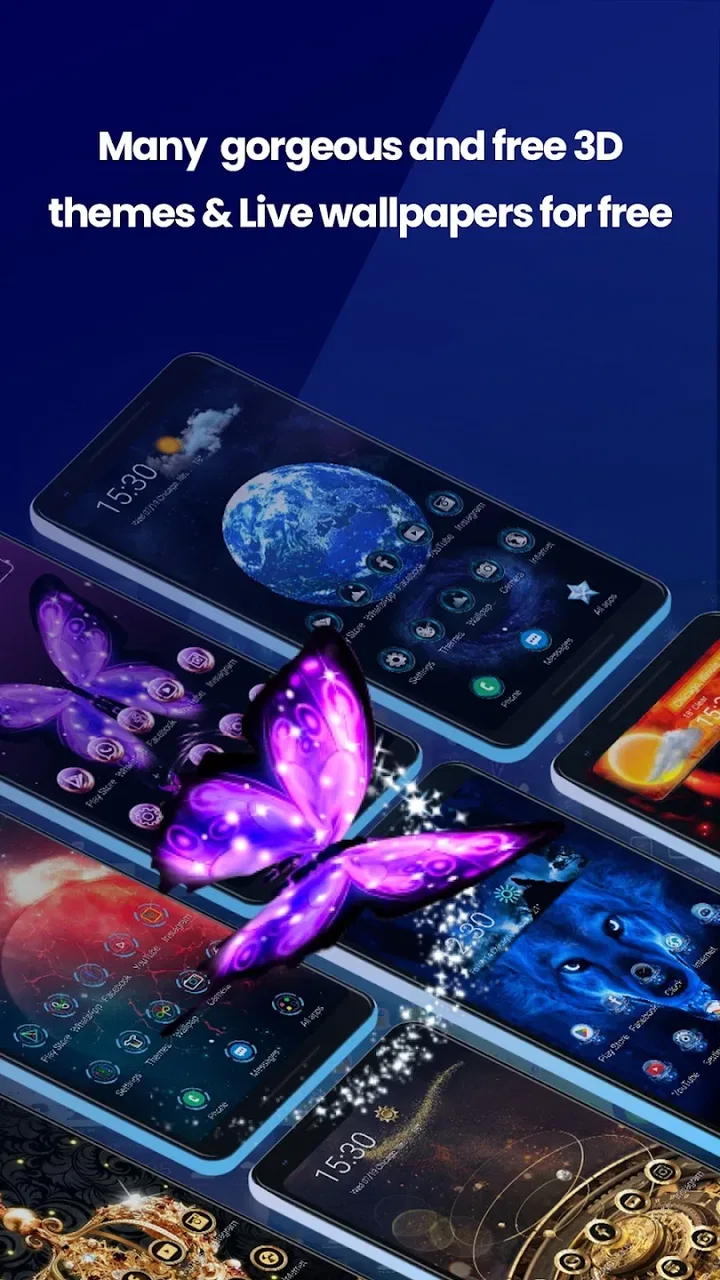
Live Launcher Lite-3Dwallpaper
- 4.0
- Rating
- 1.00M
- Installs
- Free
- Price

 Analysis by App-foxy
I installed Live Launcher Lite-3Dwallpaper expecting a simple visual refresh, and that is exactly the role it fills best: it gives an Android phone a more colorful, animated feel without asking me to replace every part of my daily setup. It is a free personalization app from LiveLauncher, rated for Everyone, and it has already passed the one-million-install mark. My first impression was that it is aimed at people who want their home screen to feel less ordinary rather than users looking for a complete productivity overhaul.
The important decision is not whether a moving wallpaper looks attractive. It is whether the extra visual energy improves your phone or becomes another layer to manage. I found Live Launcher Lite most appealing when I treated it as a lightweight style change. It works well for someone bored with a static background, someone setting up a phone for a child or family member, or anyone who wants a brighter home screen without spending money. It is less convincing for a person who values maximum battery efficiency, a perfectly minimal interface, or deep control over every launcher detail.
What I looked at before recommending it
When I judge a personalization app, I start with the daily experience rather than the first attractive screen. I want to know how quickly it changes the phone, whether the result remains comfortable after several days, and whether returning to the previous setup feels difficult. With this app, the central question is simple: do you want a fresh visual atmosphere, or do you actually need a replacement for your phone’s complete home-screen system?
You May Also Like

 Blood Strike: 2.5 Anniversary
Blood Strike’s Loadouts Turn Every Drop Into a Tactical Gamble
A close look at Blood Strike’s custom loadouts: how fast access to signature weapons reshapes its battle royale rhythm, rewards preparation, and narrows the gap between fights.

 Pandora - Music & Podcasts
Pandora’s Music Is Easy to Start, but Harder to Recover
Pandora’s strength is its low-effort path from a seed to a station. Its weak spot is how much confidence it asks you to place in connection, setup, and quiet recovery.

 8 Ball Pool
 Is Built on Rivalries, Rematches, and Routine
A close look at the rivalries, rematches, shared routines, and unanswered safety questions that turn a quick pool match into a persistent mobile community.

 Samsung Music
’s Quiet Strength Is Playing What You Already Own
Its reach comes less from spectacle than from dependable access to a personal library. That simplicity is both the app’s strongest retention engine and its ceiling.

 AccuWeather: Weather Radar
AccuWeather Review: A Quick, Clear Forecast for Everyday Decisions
For everyday plans, the best forecast is the one you can understand quickly. AccuWeather makes rain timing, radar, and local conditions easy to act on, with a few trade-offs.

 Hill Climb Racing
Why Hill Climb Racing Still Turns Crashes Into One More Run
A tiny car, a bumpy hill and one more upgrade: Hill Climb Racing keeps resurfacing because its simple chaos makes every near-miss feel personal.
More From Our News Desk



That distinction matters because “launcher” can mean different things. Some launchers focus on app organization, gestures, search, folders, and efficiency. Others are mainly about appearance. Live Launcher Lite sits closer to the visual side of that spectrum, with live wallpaper and colorful presentation at the center of its appeal. I would not choose it expecting the same kind of detailed workflow control offered by a highly configurable launcher.
Compatibility is also straightforward for many older Android phones. The app supports Android 7.0 and later, which makes it relevant if you are using a device that is no longer among the newest models. The current version is 3.6.2, so I would still check the installation screen on the exact phone you plan to use, especially if that phone has a heavily customized manufacturer interface. In my experience, home-screen tools can behave differently across Android skins even when the operating-system requirement looks suitable.
The app’s public reception gives it a useful, if not flawless, signal. It holds a 4.0 average from around 8.4 thousand ratings, with roughly 1.1 thousand written reviews. I read that as evidence of a generally positive experience with some room for personal preference. A live wallpaper can look excellent on one display and feel distracting on another, so an average score is best treated as a starting point rather than a guarantee.
The first setup is more important than it looks
My advice is to install it when you have a few quiet minutes, not while rushing out the door. A launcher or wallpaper app can affect the first screen you see, and hurriedly accepting every prompt or default choice makes it harder to understand what changed. I prefer to note the current wallpaper and home-screen arrangement first. That small precaution makes testing much less stressful because I know what I am comparing.
After applying a live design, spend time opening the apps you use most, returning to the home screen, and checking whether icons remain easy to find against the moving background. A wallpaper that looks impressive in a preview may be less practical behind small text or colorful icons. This is one of the most useful tests for Live Launcher Lite: judge it while performing normal tasks, not while staring at the preview alone.
I also recommend keeping the first choice restrained. If the app presents several visual styles, begin with the least busy option and use it through a normal day. That gives you a better sense of whether the movement is comfortable. Starting with the most dramatic effect can make the app seem exciting for five minutes but tiring after repeated unlocking.
Where the app wins over a static setup
The clearest strength is immediacy. A static wallpaper usually changes one image; a live launcher-style experience can make the entire phone feel more active. That difference is especially noticeable on a device that has started to feel familiar or dull. I found the visual refresh more satisfying than simply downloading another still background because the phone seemed to have a different mood each time I returned to the home screen.
Live Launcher Lite also has a low financial barrier. It is free, which makes experimentation easy. I can try it for a few days without treating the decision as a purchase, and a family member can test it without needing a payment method. For a personalization app, that matters: the right choice depends heavily on taste, screen size, and tolerance for motion.
Another advantage is that it can serve as a quick “reset” for a phone’s personality. I would use it after changing cases, buying a new device, or helping someone make an older phone feel more personal. It is not a replacement for cleaning up unused apps, but a new visual environment can make a familiar device feel less stale. That is a modest benefit, yet it is exactly the kind of benefit many people want from personalization software.
The Everyone content rating also makes it easier to consider for shared household devices. I would still choose the design carefully for a child or older relative, because visual movement and busy screens are matters of comfort, not just age suitability. The rating tells me the app is broadly accessible; it does not tell me that every visual style will suit every person.
A practical use case: refreshing a tired everyday phone
Imagine someone who uses the same Android phone for messaging, maps, music, and banking, but feels that the device has become visually boring. They do not want to learn a new productivity system or rebuild every folder. In that situation, I would install Live Launcher Lite, record the current home screen, choose a calm live design, and use it for a full workday. If the new background makes app labels harder to read, I would switch to a simpler look rather than abandoning the idea immediately.
That workflow reveals the app’s strongest audience. It is useful when the problem is emotional or visual—“my phone feels old”—rather than organizational—“I cannot find anything.” The app can change the atmosphere quickly, but it will not automatically solve a cluttered app drawer or a poor notification routine. Knowing that boundary prevents disappointment.
Trade-offs I noticed during regular use
Motion is the main trade-off. A moving background can make unlocking feel more lively, but repeated animation may become visual noise. I would be cautious with it if you read frequently from the home screen, use the phone in dim rooms, or prefer a distraction-free setup. The most attractive design is not always the most comfortable one, and I think the right choice is the style you can ignore after the novelty fades.
There is also a likely efficiency trade-off whenever a phone displays animated content instead of a still image. I would not assume that every device will react the same way, because screen technology, processor age, and manufacturer software all influence the experience. If battery life is already a daily concern, test the app during your normal routine rather than judging it only after a short installation session. If you notice that the visual benefit is small but the phone feels less economical, a static wallpaper is the better decision.
Older or lower-powered phones deserve extra patience. Android 7.0 compatibility makes the app available to a broad range of devices, but compatibility is not the same as identical smoothness. On a newer phone, animation may feel natural; on an older one, transitions can expose the limits of the hardware or the manufacturer’s software layer. I would use the return option built into the phone’s home-screen settings if the experience feels sluggish, rather than forcing the app to remain active.
Another limitation is the gap between visual change and functional change. If you are searching for advanced gestures, detailed icon management, powerful search, or a carefully engineered productivity layout, a dedicated launcher focused on those tools may suit you better. Live Launcher Lite can make the phone look different, but appearance alone does not guarantee faster access to the apps you use every hour.
How it compares with the usual alternatives
The closest alternative is simply staying with the phone’s built-in wallpaper and launcher. That option usually wins for familiarity and minimal adjustment. You already know where everything is, and there is no new visual layer to evaluate. I would choose the default setup for a work phone, a device shared by several people, or any phone where predictability matters more than personality.
Static wallpaper apps are another sensible alternative. They can offer a strong visual identity without motion, which is useful for people who want color but not animation. A still image is also easier to judge behind icons and text. If your main goal is to make the screen feel warmer or more attractive while keeping the interface quiet, a static option may deliver most of the benefit with less visual activity.
Full-featured third-party launchers are better suited to users who want to rebuild the way they interact with Android. They may appeal to someone who wants custom grids, gestures, folders, search behavior, or a highly controlled layout. I would not switch to one merely because I wanted a colorful background. The learning curve and setup work can outweigh the visual improvement if your only complaint is that the current wallpaper feels dull.
Live Launcher Lite makes the most sense between those extremes. It is more expressive than a standard static setup, but it does not need to become a major phone-management project. That middle position is its real identity. It is not the strongest choice for every launcher task, yet it is a reasonable first experiment for someone who wants a livelier home screen at no cost.
Who should skip it
I would skip it if your phone is already difficult to use because of clutter, tiny text, or an overloaded home screen. A moving background can make that problem more noticeable instead of fixing it. Clean up the existing layout first, then decide whether animation adds anything useful. I would also skip it if you strongly prefer a plain, quiet display or if you know that motion quickly becomes irritating.
People with strict battery routines should be selective too. I would not install a live wallpaper on a phone that is already struggling to last through the day unless I was willing to test it carefully and remove it quickly if the trade-off was poor. The app is free, so the financial risk is low, but time and convenience still count. A personalization change should not create a daily charging problem.
Finally, users seeking deep interface customization should look elsewhere first. The name may suggest a complete launcher replacement, but my recommendation is based on its visual-refresh role. If your priority is arranging dozens of apps with precision, building gesture shortcuts, or creating a specialized work layout, choose a tool designed around those tasks rather than expecting a wallpaper-centered app to provide them.
Making the switch without losing your routine
The cost of switching is mostly practical rather than financial. Before applying it, take a quick mental snapshot of your home screen: note the position of your essential apps, remember which page contains your widgets, and avoid changing several other personalization settings at the same time. Testing one variable makes the result easier to understand.
For a fair trial, use the app during both active and quiet parts of the day. Check the screen when you are replying to messages, when you are unlocking quickly, and when you are looking for an app without thinking. These moments reveal whether the design supports your routine or merely looks good in a preview. If you return to the default setup, doing so should be treated as a useful result, not a failed experiment.
I would also keep the installation focused. Do not reorganize every icon on the same day unless that is your actual goal. Live Launcher Lite is easiest to evaluate when the only major change is the visual treatment. Once you know you like it, you can decide whether a small rearrangement improves the result. This approach avoids confusing a wallpaper preference with a broader launcher preference.
Because the app is free and rated for Everyone, it is easy to recommend as a trial for a personal device. Still, I would explain the change before applying it to someone else’s phone. A relative may appreciate a brighter screen, or they may find motion confusing. Letting the owner choose the style is more important than making the phone look impressive to someone else.
My recommendation after weighing the alternatives
Live Launcher Lite is worth trying if your main wish is to make an Android phone feel fresher and more colorful without paying or committing to a complicated new workflow. LiveLauncher has built an app with broad reach, and its 1M+ installs show that the idea has found a sizeable audience. I see it as a friendly personalization experiment rather than a universal replacement for every Android launcher.
My strongest recommendation is to judge it by comfort after the first day, not excitement during the first minute. Choose a design that keeps icons readable, watch how your phone behaves during normal use, and be honest about whether the animation improves your routine. If it does, the app gives an older or ordinary-looking device a welcome sense of character. If it does not, returning to a static wallpaper costs very little effort.
In short, I would recommend it to casual customizers, colorful-design fans, and anyone who wants a free visual change with a low commitment. I would point power users toward a more control-focused launcher, and I would steer battery-conscious users toward a static background unless testing proves otherwise. The best reason to choose Live Launcher Lite is not that it transforms Android completely; it is that it can make the first screen you see feel new again.
For me, that is enough to make it a worthwhile app in the personalization category. Live Launcher Lite-3Dwallpaper does not need to replace every alternative to be useful. It simply needs to give the right person a more enjoyable home screen, and for that specific purpose, Live Launcher Lite-3Dwallpaper is an easy, free option to put through its own short trial.
FAQs for Live Launcher Lite-3Dwallpaper
01What is Live Launcher Lite-3D Wallpaper and how does it work?
Live Launcher Lite-3D Wallpaper is an app designed to enhance your smartphone's home screen with interactive 3D wallpapers. It offers a lightweight and efficient launcher that optimizes your device's performance while providing a visually stunning user experience. Users can select from a variety of dynamic wallpapers that respond to touch and motion, adding a personalized and engaging element to their device.
02Is Live Launcher Lite-3D Wallpaper compatible with all Android devices?
Live Launcher Lite-3D Wallpaper is compatible with most Android devices running Android 5.0 and above. However, the performance and functionality may vary depending on your device’s specifications. Lower-end devices might experience reduced performance, so it's recommended to check the app’s requirements and reviews for your specific device before downloading.
03Does Live Launcher Lite-3D Wallpaper consume a lot of battery?
The app is designed to be lightweight and efficient, minimizing battery consumption compared to other live wallpaper apps. However, because it uses motion and touch-responsive 3D graphics, it can still use more battery than static wallpapers. Users concerned about battery life can adjust settings to optimize performance and reduce energy use.
04Are there customization options available in Live Launcher Lite-3D Wallpaper?
Yes, Live Launcher Lite-3D Wallpaper provides a range of customization options. Users can choose from various 3D wallpapers and adjust settings such as animation speed and effects. The app also allows for integration with popular widgets and icons, giving users the flexibility to create a unique and personalized home screen experience.
05Is Live Launcher Lite-3D Wallpaper free to use, or are there in-app purchases?
Live Launcher Lite-3D Wallpaper is free to download and use, offering a selection of basic features at no cost. However, there are in-app purchases available for users who wish to access premium wallpapers and additional customization options. These purchases can enhance the app’s functionality and provide a more diverse range of visual themes.
Pros
- Intuitive and user-friendly interface.
- Wide variety of 3D wallpapers available.
- Lightweight app with minimal storage use.
- Smooth performance on most devices.
- Regular updates with new features.
Cons
- Limited customization options for widgets.
- Some wallpapers may drain battery quickly.
- Contains ads that can be intrusive.
- Requires internet for certain features.
- Not all wallpapers are free to use.

Live Launcher Lite-3Dwallpaper
Gallery